SoundCloud to MP3
Download SoundCloud music and playlists to MP3 online for free
By using this site, you agree to the Terms of Service
How to Use SoundCloud to MP3 on SCTOMP3
SCTOMP3 is designed so that anyone can use it within seconds - even if you’ve never used an audio converter before.
Copy the SoundCloud track or playlist link
Open SoundCloud Choose the song, remix, DJ set, or playlist you want to download Click “Share” and copy the link
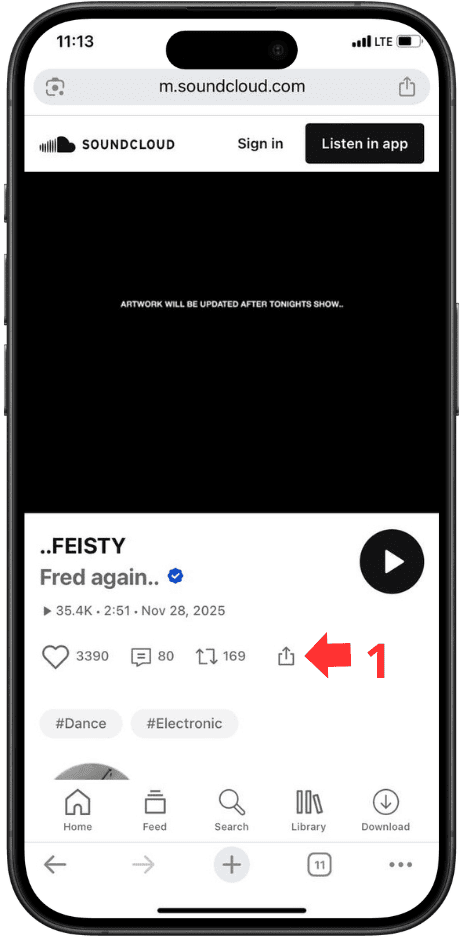
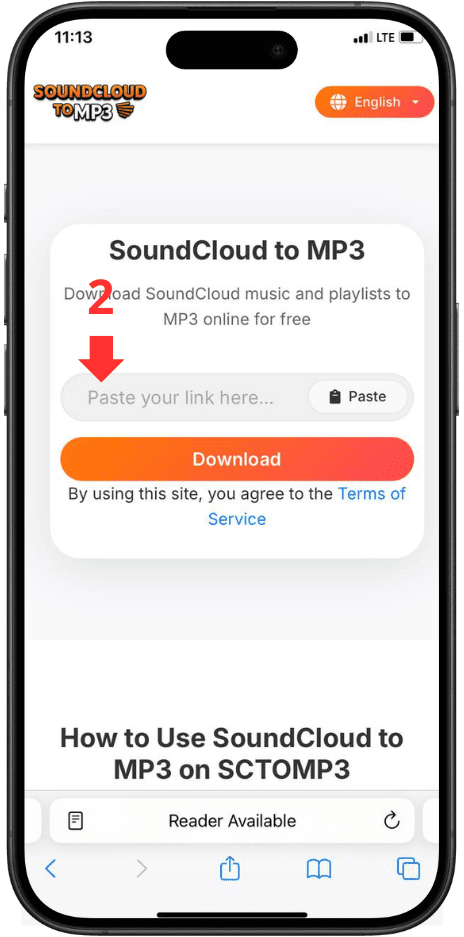
Paste the link into the SCTOMP3
Visit SCTOMP3 and paste the link into the “SoundCloud to MP3 Converter” input box.
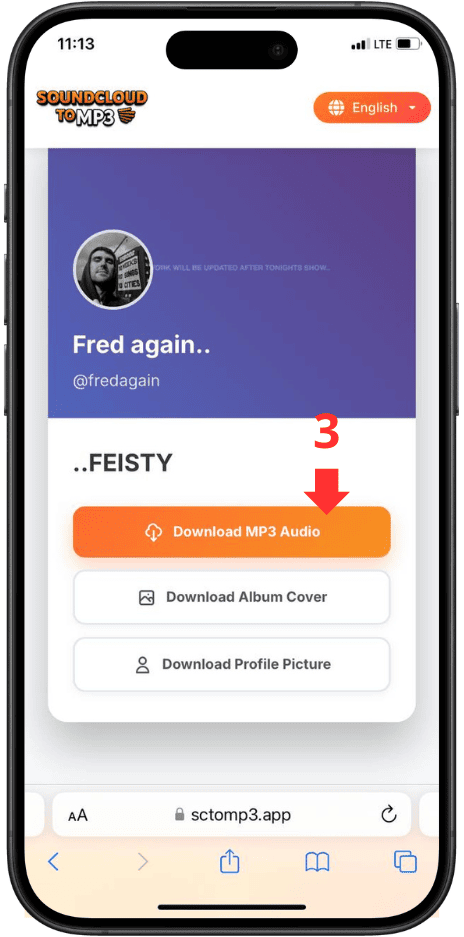
Click Download
Choose to download a single track or the entire playlist
Today, online music streaming has become incredibly popular. SoundCloud is one of the most beloved platforms among artists, DJs, producers, and listeners worldwide. However, SoundCloud does not allow users to download all tracks directly. Because of this, the need to download music for offline listening, for use in personal music players, or to save playlists has increased significantly. That’s exactly why SoundCloud to MP3 tools were created.
If you’re looking for a quick and free solution to download songs, playlists, albums, or any audio from SoundCloud, then SCTOMP3 is the perfect choice for you.
1. What is SoundCloud to MP3?
“SoundCloud to MP3” refers to tools or services that allow users to convert SoundCloud tracks, playlists, or audio content into MP3 – the most commonly used audio format today.
Why convert SoundCloud to MP3?
-
MP3 is easy to use and compatible with all devices: phones, PCs, Bluetooth speakers, MP3 players…
-
You can listen offline without the Internet.
-
Easier to manage, store, and organize personal playlists.
-
Useful for studying, audio research, remixing, or referencing.
However, SoundCloud does not allow downloads for all tracks, especially those where the artist has disabled downloads. Therefore, users need third-party tools - like SCTOMP3 - to save audio in high-quality MP3 format.
The important thing is that the tool must be safe, fast, simple, and reliable. That’s exactly why SCTOMP3 was created.
2. Outstanding Features of SCTOMP3
Here are the key advantages that make SCTOMP3 one of the most popular SoundCloud downloaders:
High-quality MP3 downloads
SCTOMP3 supports:
-
128kbps
-
192kbps
-
320kbps (if available from the original track)
This ensures the downloaded audio maintains its clarity and detail.
Full playlist download support
Unlike many tools that only allow individual track downloads, SCTOMP3 supports:
-
Long playlists
-
Albums
-
DJ sets
-
Collections and mixes
You can download everything at once.
Fast conversion speed
The system is optimized to analyze links and convert instantly - even for long playlists.
Browser-based
No software required.
No extensions.
No login.
Just open the website - paste the link - download.
Works on all devices
-
Windows / Mac computers
-
iPhone / Android
-
Tablets
-
Chrome, Safari, Firefox, Edge…
No download limits
Use as many times as you want - completely free.
Safe & private
We do not store user data, require accounts, or collect personal information. All conversions occur directly between your device and SoundCloud.
3. Why Choose Our SoundCloud to MP3 Tool?
When you search for a SoundCloud to MP3 converter, you’ll find many options. But what makes SCTOMP3 different is the simplicity, speed, and stable experience it offers.
Here are the reasons thousands of users choose us daily:
1. Extremely fast conversion
Our system is optimized to generate MP3 files within seconds, even for large playlists.
2. Best possible audio quality
SCTOMP3 always prioritizes the highest MP3 quality available from the original SoundCloud file - ideal for:
-
High-quality music listeners
-
DJs and producers
-
Students and editors
3. Full playlist download support
Download:
-
Playlists
-
Albums
-
DJ sets
-
Single or all tracks automatically
4. No software installation
No apps
No extensions
No registration
100% web-based.
5. Simple, clean interface
-
No clutter
-
No annoying ads
-
No pop-ups
-
Clear buttons
Just paste → download.
6. Secure & private
-
No accounts
-
No history saved
-
No data collection
-
No device permissions
7. Works on every device
Compatible with:
-
Windows / macOS
-
Android / iOS
-
All browsers
-
All screen sizes
8. Stable and regularly updated
SoundCloud frequently updates its system, breaking many downloaders.
SCTOMP3 is continuously updated to ensure:
-
Accurate conversion
-
Playlist support
-
Consistent speed
-
Error-free performance
9. Unlimited downloads
No quotas.
No VIP upgrades.
No locked features.
10. User experience first
Our goal is simple:
Make downloading SoundCloud audio as fast, easy, and stable as possible.
4. Disclaimer
SCTOMP3 is an online tool that helps users convert and download audio from SoundCloud for personal, educational, and reference purposes. We do not store, copy, distribute, or maintain any audio files on our servers. All content is processed directly from publicly available SoundCloud sources.
Users are fully responsible for:
-
Downloading tracks, playlists, or any content
-
Using the downloaded MP3 files
-
Complying with copyright laws and SoundCloud’s Terms of Service
We encourage users to only download content you have the right to use.
SCTOMP3 is not liable for any misuse, copyright violations, or unlawful activities.
SCTOMP3 is provided “as-is.”
We do not guarantee uninterrupted service or error-free performance, especially when SoundCloud updates its structure or policies.
Conclusion
SCTOMP3 is a simple, fast, and free solution for anyone who wants to download music, playlists, or audio from SoundCloud in MP3 format. With its high speed, easy-to-use interface, and high-quality conversion, this tool is ideal for offline listeners, DJs, producers, video creators, language learners, or anyone who needs reliable audio storage.
If you’re looking for a stable and trustworthy SoundCloud to MP3 downloader, SCTOMP3 is definitely a great long-term choice.
Frequently Asked Questions
SoundCloud to MP3 is a tool that allows you to convert songs, tracks, remixes, or playlists from SoundCloud into MP3 format for offline listening.
SCTOMP3 works directly in your browser: simply paste the SoundCloud link, and the system will automatically analyze, convert, and generate the MP3 file for download. No software installation or account registration required.
Yes. SCTOMP3 is completely free.
You can download as many tracks as you want with no usage limits. There are no hidden fees and no VIP upgrade requirements like many other SoundCloud downloaders.
No. SCTOMP3 does not require login, does not collect user information, and does not require any account creation. Everything operates anonymously and safely.
Yes. This is one of SCTOMP3’s strongest features.
Just paste the playlist link, and the tool will automatically display all tracks, allowing you to download them individually or all at once.
SCTOMP3 always preserves the highest quality available from the original SoundCloud file. Typically, you can get:
-
128kbps
-
192kbps
-
256kbps
-
320kbps (if supported by the original track)
We do not recompress or reduce audio quality like many other downloaders.
Yes, completely safe.
SCTOMP3:
-
Contains no malware
-
Doesn’t request device permissions
-
Doesn’t store your download history or content
-
Doesn’t require SoundCloud login
All conversions take place directly and no data is stored.
Yes. The tool is fully compatible with:
-
iPhone
-
Android
-
iPad
-
Tablets
-
All major browsers (Chrome, Safari, Firefox, Edge)
Just open the website and paste the link - no installation required.
Absolutely. SCTOMP3 works perfectly on Windows, macOS, and Linux. Long playlists are also processed quickly and smoothly on desktop devices.
No. MP3 files are generated directly from SoundCloud without modifications or inserted code. SCTOMP3 does not alter file content—it only converts the format and allows you to download it.
No limits at all. You can download:
-
Unlimited tracks
-
Playlists of any length
-
As many times as you want
There are no quotas like paid applications.
Some tracks may be restricted by SoundCloud or blocked in certain countries. SCTOMP3 tries to support as much as possible, but if a track is locked or access-restricted, you can try:
-
Using a VPN
-
Checking if the link is publicly accessible
-
Trying again after a few minutes
Most tracks download normally.
SCTOMP3 only provides the conversion tool.
How you use the downloaded files must comply with SoundCloud’s copyright policies and your local laws. We recommend using it for personal, educational, and non-commercial purposes unless you have the rights to use the content.
Currently, the tool focuses on MP3 to ensure fast speed, small file size, and maximum compatibility. However, we are researching support for high-quality formats like WAV/FLAC in the future.
Yes. The tool is updated regularly to ensure stable performance even when SoundCloud modifies its structure or API.
-
Faster conversion speed
-
Fewer ads
-
Full playlist support
-
No installation required
-
No download limits
-
Safe and data-free
-
High-quality MP3 output
We focus on user experience and long-term stability.